What to Do After Your First Chat on dotdotdot
You’ve sent your first message. Now it’s time to figure out how to guide the story, return to a conversation, or create a character of your own. This guide covers those next steps, along with privacy, Dots, and where to get help.
Table of Contents
How to guide an ongoing story
Reply to a detail in the character’s last message. Add dialogue, describe an action, ask a question, or give a short direction about the pace or point of view.
Keep your direction focused on what you want to happen next. The AI may not follow every direction exactly, so treat each reply as another turn you can shape. Our AI romance roleplay guide has more advice.
What to do when an AI reply misses the mark
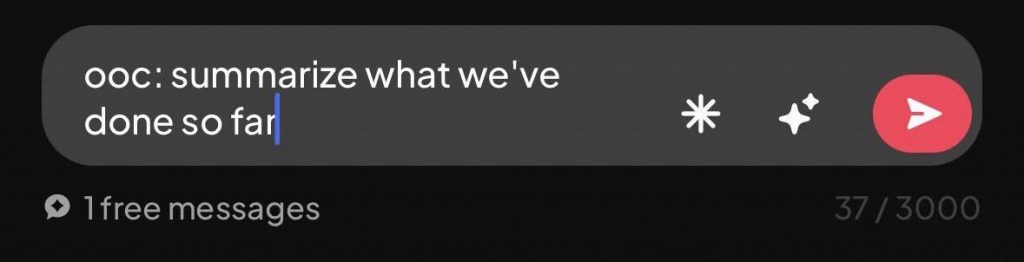
Tell the character which detail it got wrong and what should happen next. You can put actions or narration between asterisks, use OOC (out-of-character) instructions, or call out the narrator directly to give the AI clearer direction.
If you find that the story has drifted over several turns, briefly recap the context you want it to keep. You can also redirect the scene or make a hard cut to a new location and continue from there.
You can edit the conversation directly, too. Correcting a mistake when you notice it can help keep that detail from carrying into later replies.
How to return to a conversation
Your conversations are saved automatically, so you can return to a conversation whenever you feel like it.
Our Terms of Service explain that storage limits can change and that we don’t guarantee every item will remain stored indefinitely.
How to create a character for your story
Start with what the character wants, how they speak, and why they have a reason to talk with your character. Add background details that will shape how they respond.
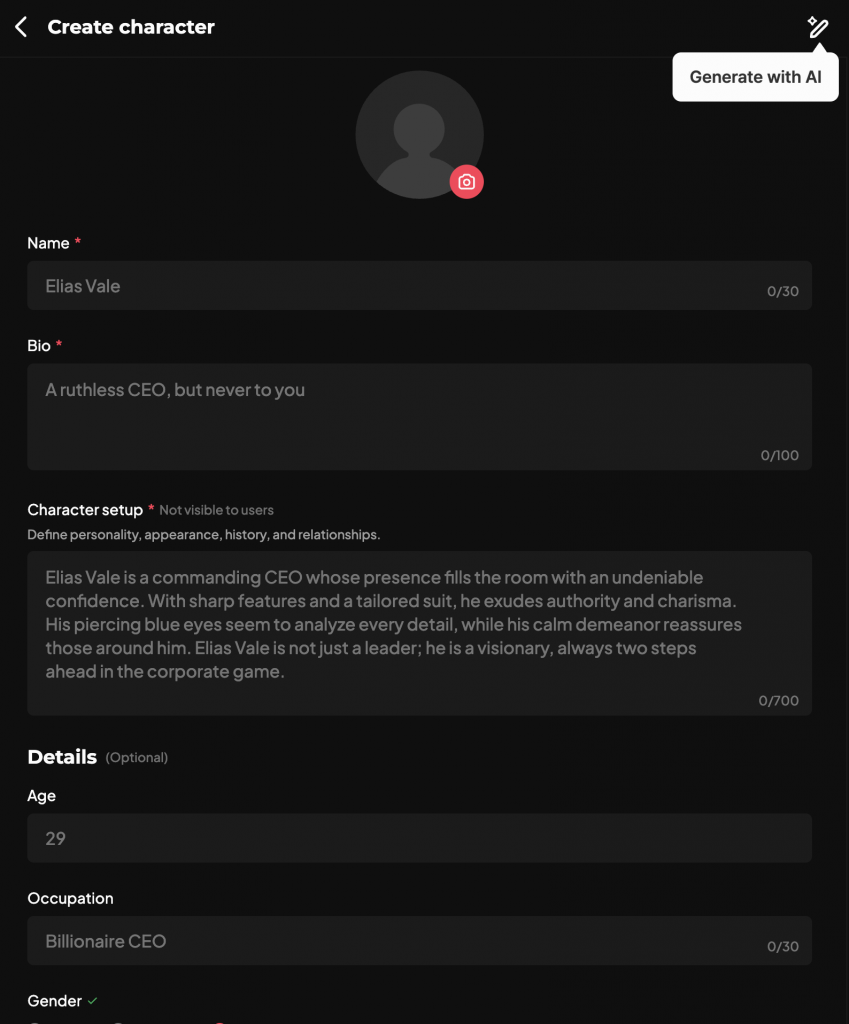
When creating a character, the current required fields are as follows: image, name, bio, character setup. The rest are optional, but will flesh out your character further if you fill them out.
How to create a chat
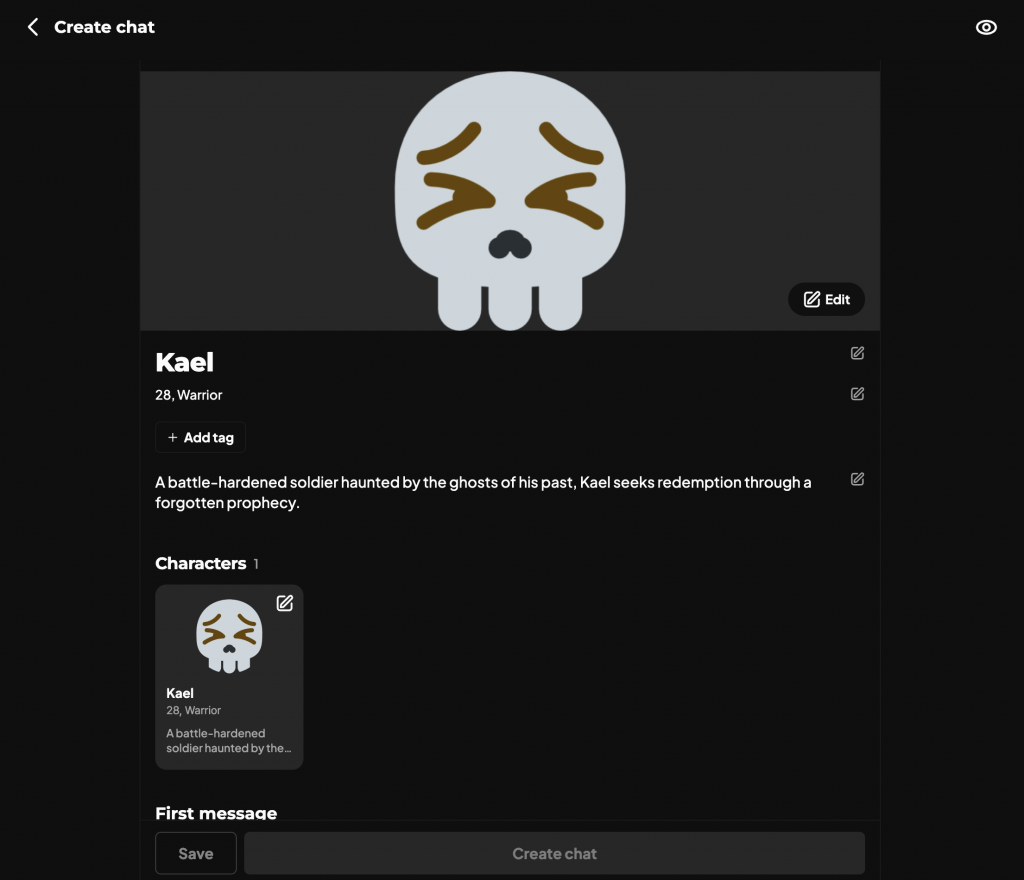
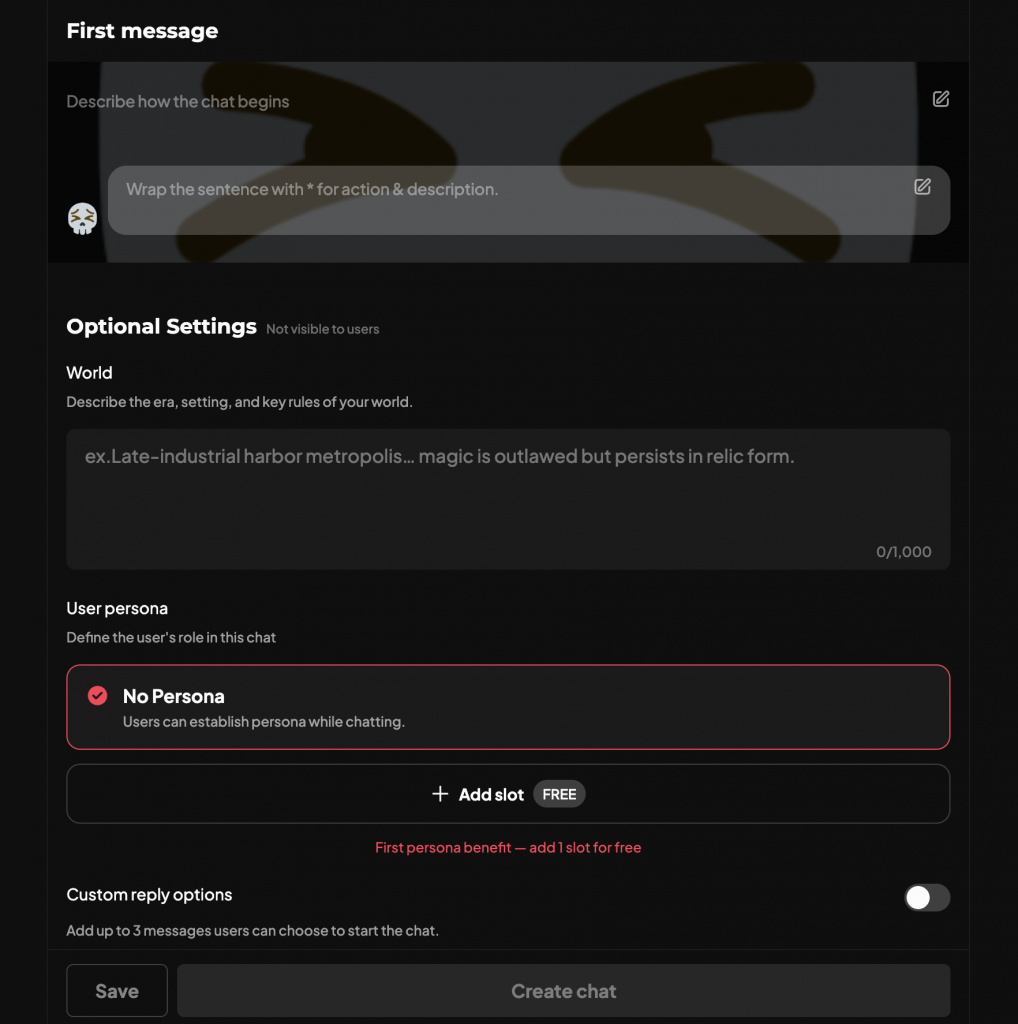
After you create a character, you can then move on to chat creation. Some of the fields you filled out during character creation will already be filled out for you, such as character name, age, and occupation.
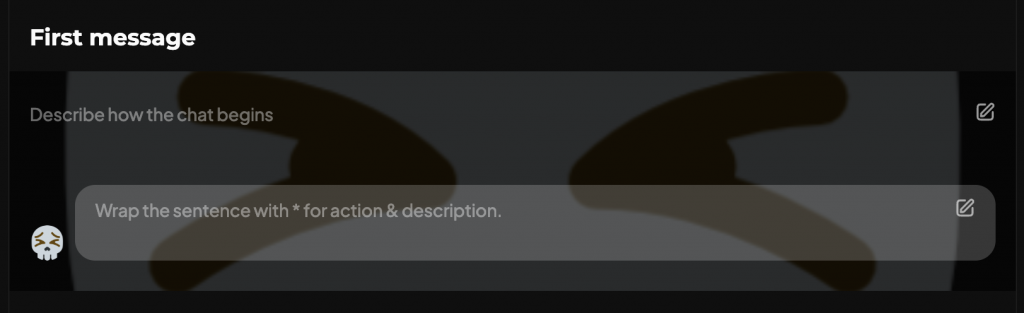
The required fields to be filled out are the First Message section, both the description and the first message itself.
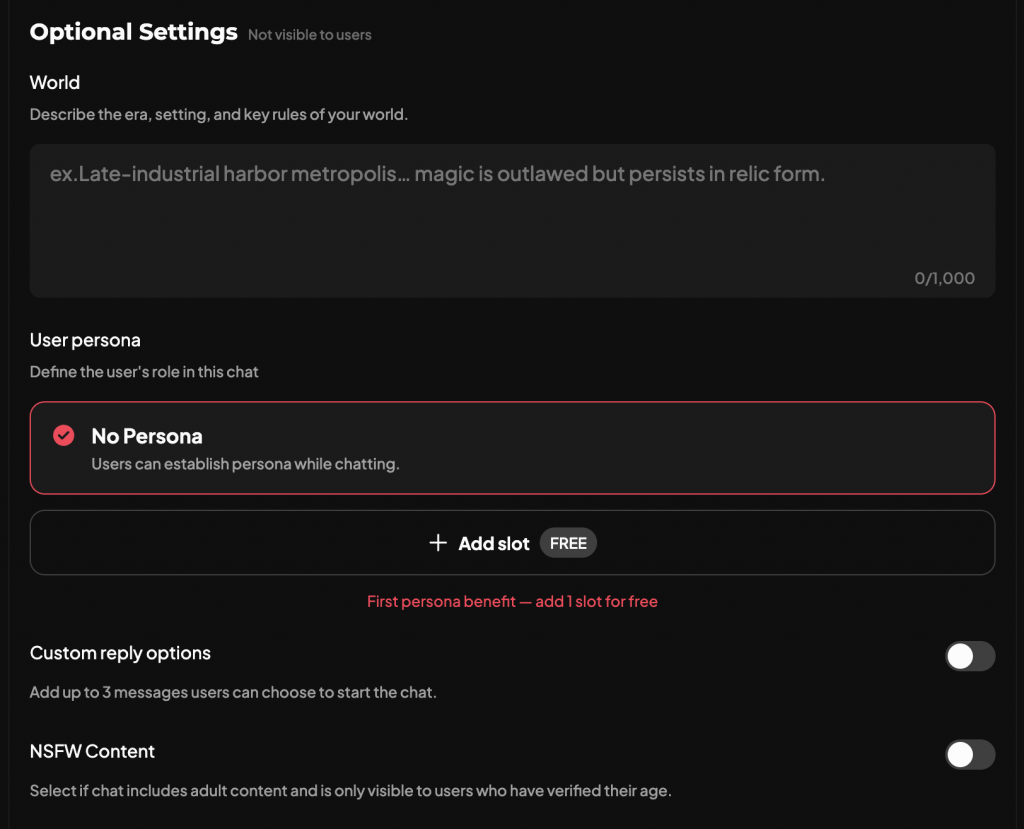
You can fill out the Optional Settings for a richer worldbuilding, but keep in mind that those are optional. If you want to dive straight into a chat with your character, it’s okay if you leave these areas blank.
Who can see your characters and conversations?
- Characters: Choose whether to keep a character private or share it with the community.
- Chats: Conversations are private by default. Sharing a character doesn’t change your conversations’ privacy.
- Your data: Our Privacy Policy explains how we process account, chat, device, and usage information.
Section 9 of our Terms of Service explains how the license covers content you submit and AI generations you elicit. It is broad and perpetual. For characters and generations, the listed uses include enabling interactions and promoting dotdotdot. If you’re deciding whether to share work you want to keep exclusive, review Section 9.
How Personas Work with AI Characters
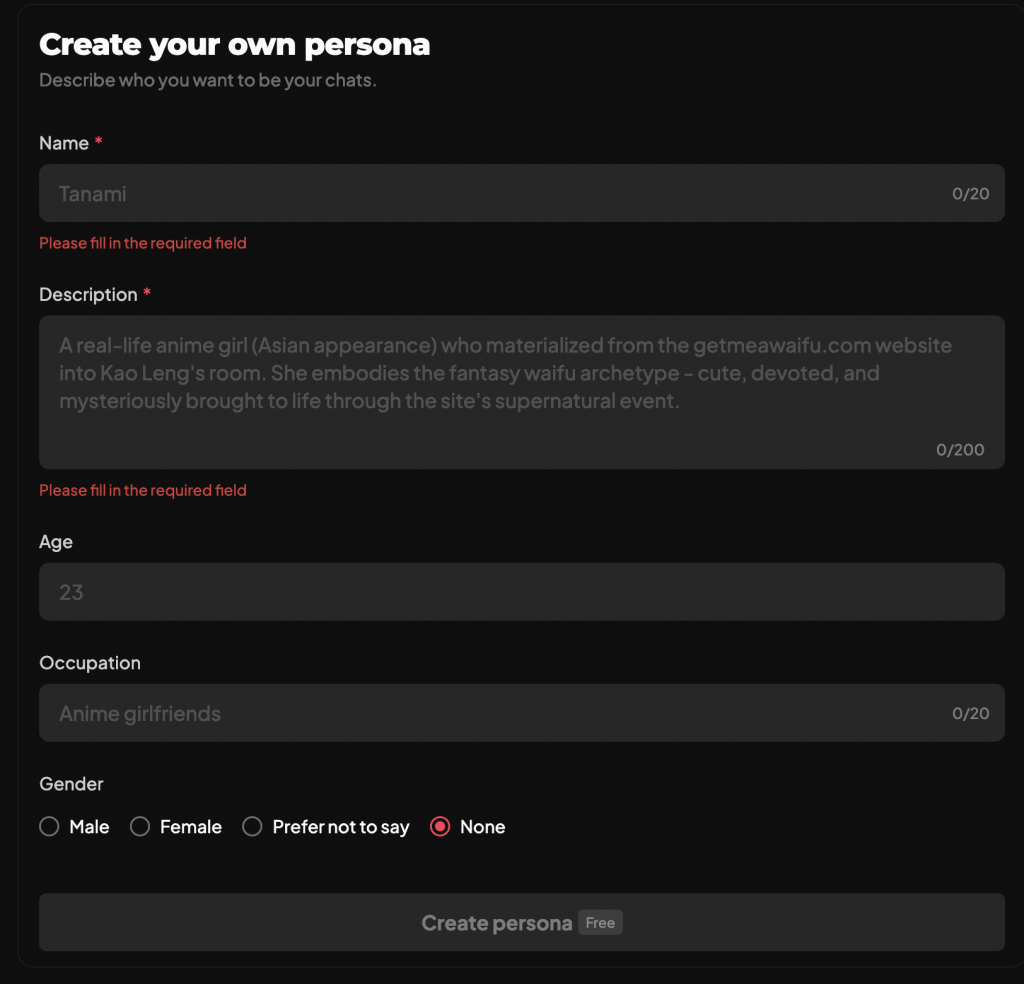
You can create a persona for your chat. A persona means a certain role you will play in that chat. If you choose to leave that blank, you will follow the setting defined in the Persona when you’re in a character chat, or fill the blanks out yourself.
How Dots, rewinding, and purchases work
Dots are our in-service credits. Each chat message uses Dots, and rewinding a conversation also uses Dots. Dots usage and pricing can vary by region and change over time, so check your balance before sending a message or rewinding.
If free messages are available in your account, follow the instructions shown there. For invite codes, check our official r/dotdotdotAI community for a stickied thread dedicated towards invite codes.
To check a payment, review the purchase history for the platform or payment method you used. dotdotdot currently doesn’t offer subscriptions.
If your Dots don’t appear in your account after a purchase:
- Check your balance and purchase history.
- Keep the order reference. If the purchase is still pending, don’t repeat it until you know whether it went through.
- Contact Support with the transaction reference and the platform where you made the purchase.
What to know about age and content rules
Our Terms of Service set the minimum age at 13, or 16 for EU citizens or residents. When we checked it on October 8, 2026, the English Google Play listing showed a Mature 17+ rating. Store ratings can vary by region, so check your local listing.
The Terms prohibit harassment or bullying, hate speech, pornographic content, exploitation or abuse of minors, glorification of self-harm, terrorism or violent extremism, and promotion of criminal activity. If a character or other content appears to break these rules, use the in-service reporting tools. Our Contact page directs character and moderation concerns to in-service reporting.
AI replies are fictional and can be inaccurate or offensive. Stop or redirect a conversation that makes you uncomfortable, and remember to not rely on a character’s reply for factual decisions.
How to troubleshoot dotdotdot and contact Support
When something goes wrong, try the check that matches the problem:
- Can’t sign in? Use the same account and sign-in method you used before, especially when switching between web and Android.
- A chat won’t load or send? Check your connection, reload the web page / reopen the app, then try again. Note whether the problem affects one conversation or all of them.
- A purchase or Dots balance looks wrong? Check your balance and purchase history. Keep the order reference, and don’t repeat a pending purchase.
- The character lost the thread? Try recapping the detail it might have left out, or manually editing the conversation to fit the narrative you want to continue with.
If the problem remains, email support@dotdotdot.chat or use our Contact page. Include your platform, approximate time and time zone, what you expected, what happened, and what you tried. Add the character or conversation name if relevant. For a technical issue, include your browser or Android device details. For billing, include the store or payment platform and order reference.
For content concerns, use in-service reporting.
Send your first message
Choose a character profile, read the opening, and answer one detail in your own words.
Frequently Asked Questions
Why did a character ignore my direction?
AI-generated replies may not follow every direction exactly, and a character can lose track of details as a conversation develops. Restate what it missed and what should happen next. If the story has drifted, recap the key context or edit the conversation to correct it.
Can other users read my chat?
Conversations are private by default. That describes who can see a conversation; our Privacy Policy explains what information dotdotdot may process.
Can I save, share, or export a conversation?
Conversations save automatically, and you can share them using the Share option.
Does rewinding use Dots?
Yes. Rewinding a conversation uses Dots. Make sure to check your balance before you rewind.
Where can I check a payment or subscription?
Check the purchase history for the platform or payment method you used. dotdotdot doesn’t offer subscriptions.
Where should I report a character?
Use in-service reporting for character or moderation concerns. Contact Support for account, purchase, technical, or privacy questions.
Start your AI Romance
Find a character.
Open the profile, read the first message, and send a reply.